Galaxy D2C / InGestX family

DBX WON

See it before you build it.

Turn CSV, JSON and SQLite files into clean SQLite databases. Design the steps on a visual canvas, catch duplicates and broken references in a dry run, then build a brand-new database with an audit receipt. Your existing files are never overwritten.

$129.99

USD · one-time purchase · perpetual license · no subscription

Coming to the Microsoft Store. This page will link to the listing as soon as it is public.

Windows 10 (2004 or later) x64 · Local processing · No account

DBX WON / Database BuilderWindows
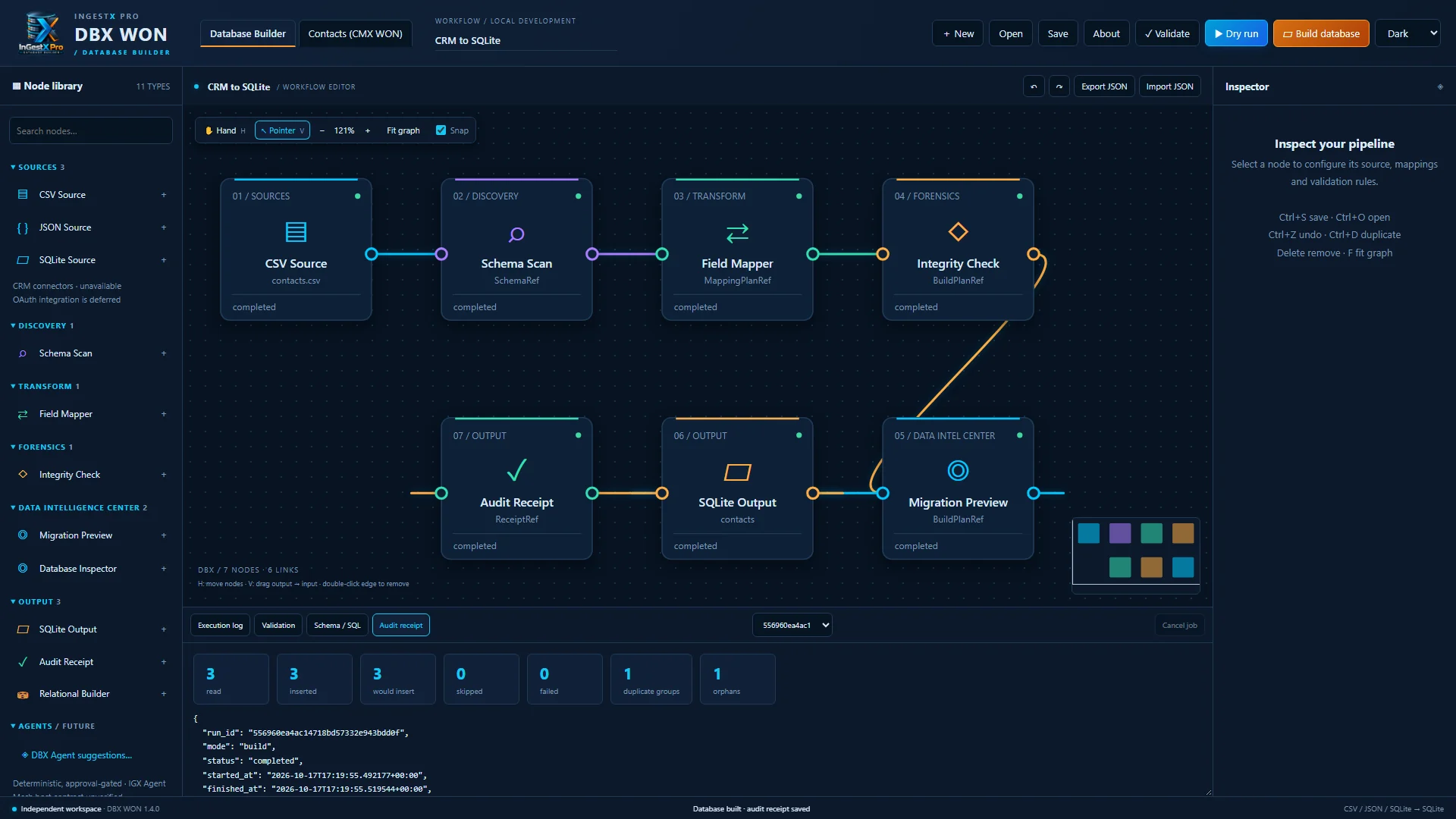
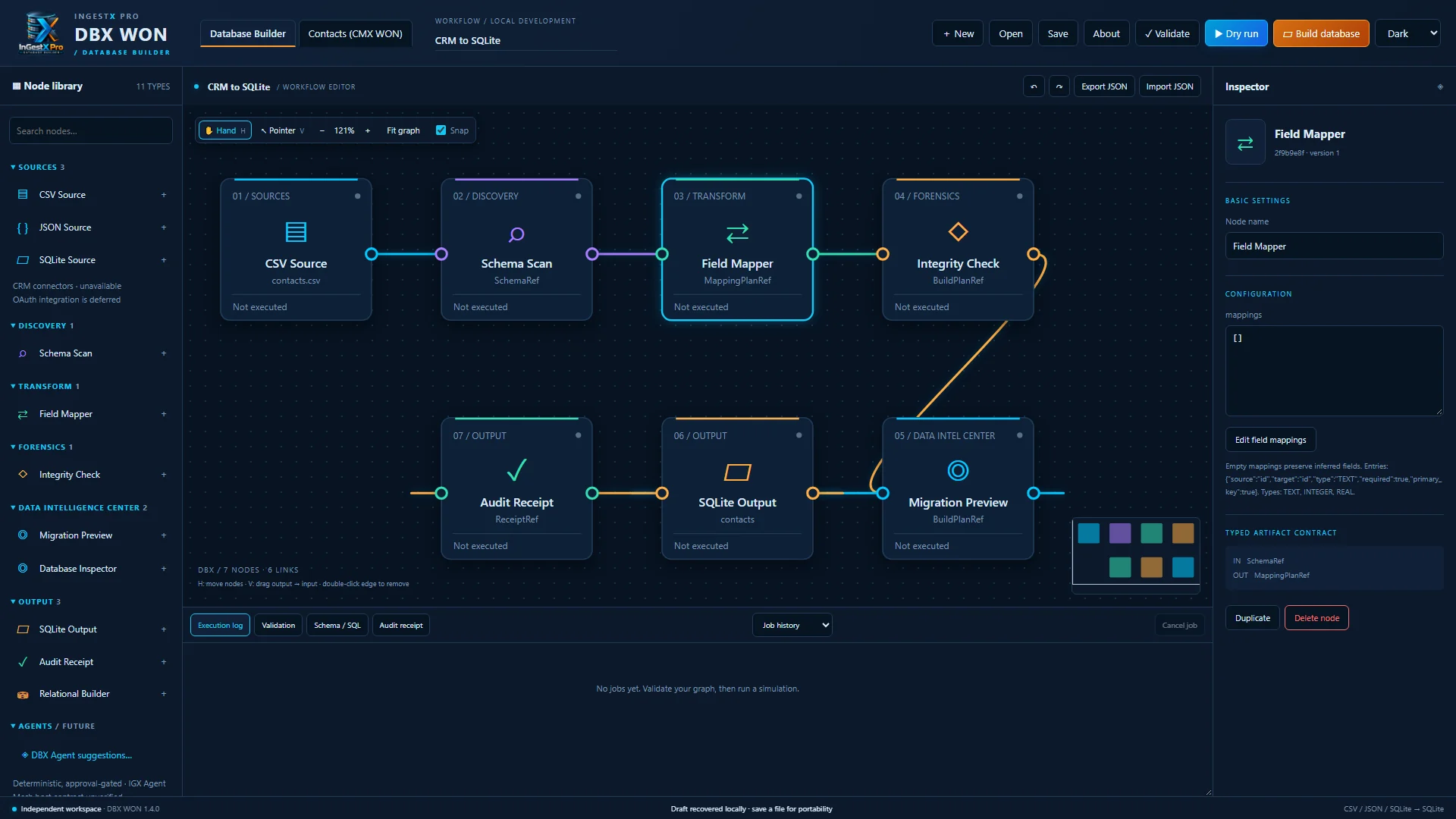
Actual DBX WON window: a CSV to SQLite workflow on the canvas with the node library and inspector
Actual application · Sample data shown

What it is

A careful way to move business data.

One wrong import can damage records you depend on. DBX WON makes every step visible: what each column is, what will be written, what is wrong with the data, and what happened after the build.

It is built for people who clean, migrate and consolidate data: analysts, operations and CRM administrators, consultants and small businesses moving spreadsheets and exports into a proper database. Everything runs on your PC, with no account and no cloud service.
Features

What you can do with it

Visual workflow editor

Build a pipeline on a canvas: a source, schema scan, field mapping, integrity checks and a SQLite output. Typed connections refuse wiring that cannot work. Undo and redo, save and open, and automatic recovery of your draft.

DBX WON workflow editor: CSV Source, Schema Scan, Field Mapper, Integrity Check, Migration Preview, SQLite Output and Audit Receipt nodes connected on the canvas

Field mapping

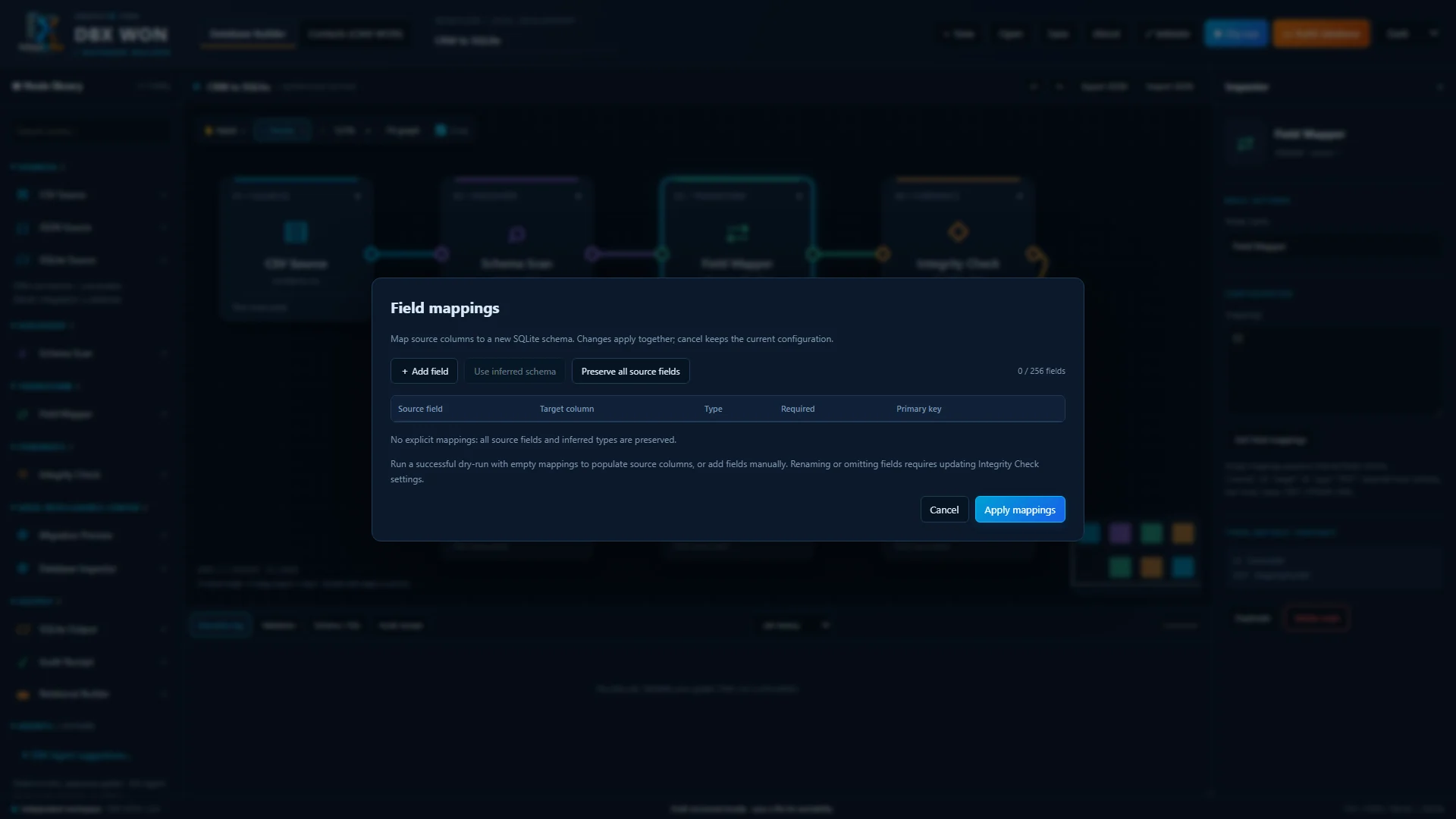
Rename columns, choose TEXT, INTEGER or REAL, and mark required fields and primary keys. Start from the types found in a dry run.

Field mapping editor listing source columns with target names, types, required and key settings

Dry run before every write

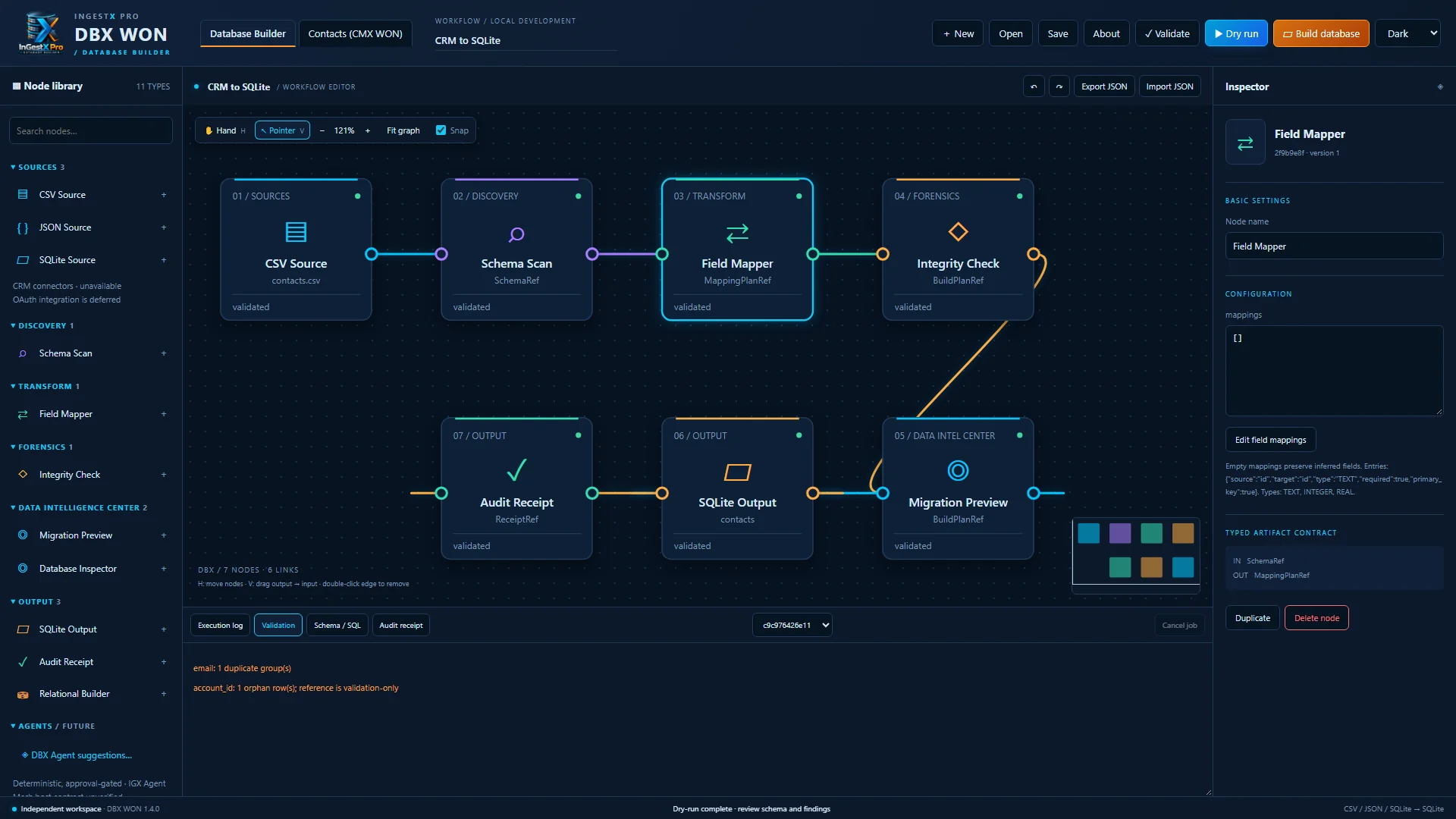
Run the whole workflow first without writing anything. DBX WON reports duplicates, missing required values and references to records that do not exist, with the SQL it would run.

Dry run results reporting one duplicate email group and one orphan account reference

A new database and an audit receipt, every time

A build runs only after a successful dry run and your confirmation. It always writes a new SQLite file and refuses existing names, then records counts, hashes, timings and paths in an audit receipt.

Completed build with read, inserted, skipped, duplicate and orphan counts and the audit receipt

Data Intelligence Center and repair plans

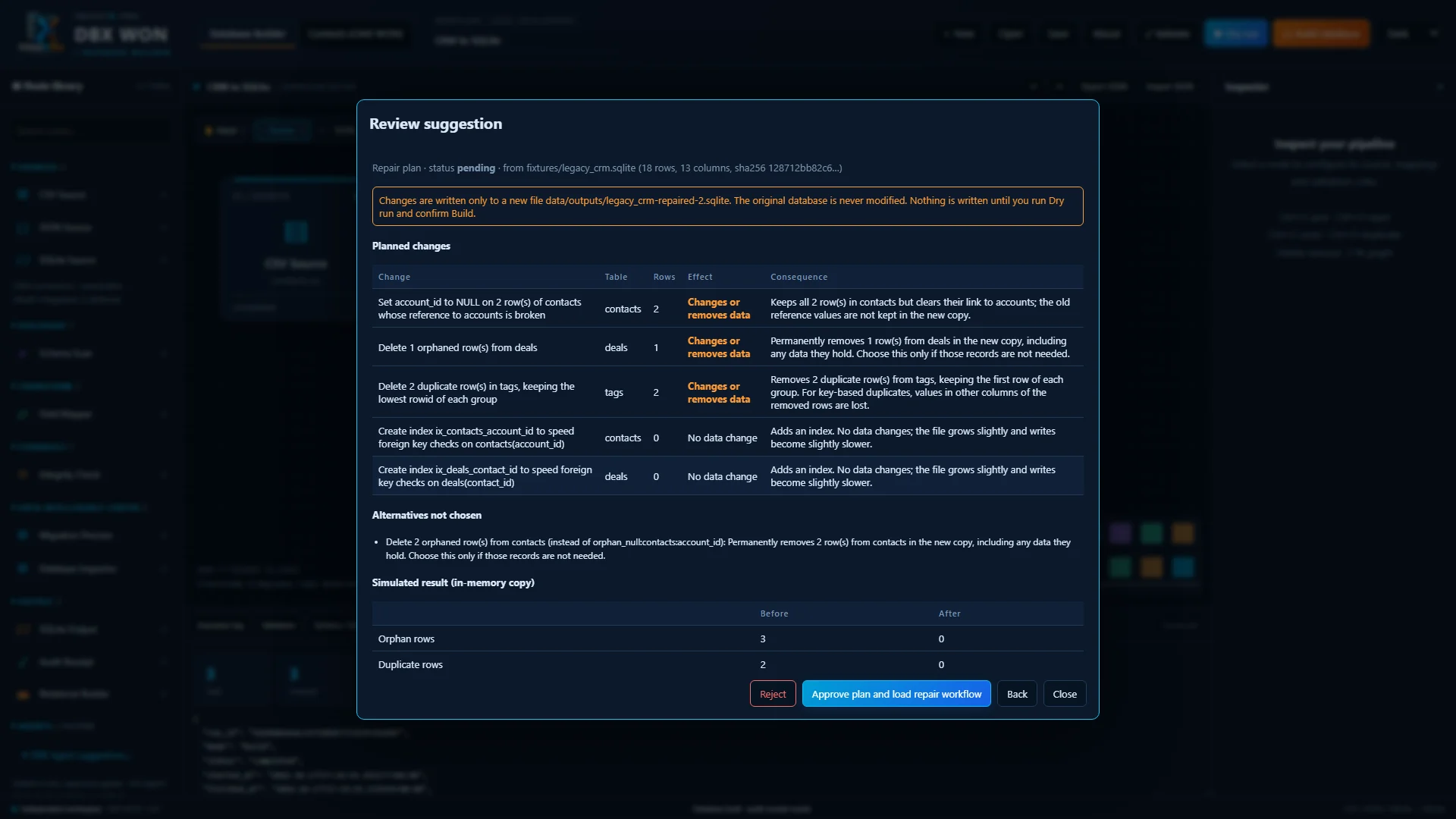
Inspect an existing SQLite database read-only, find orphans and duplicates, and compare schemas. A repair plan lists every change, how many rows it affects and what it costs, and approved repairs are written to a new copy. The original is never modified.

Repair plan for a legacy CRM database listing each planned change, affected rows, effect and consequence, with before and after counts

DBX Agent, a rule-based assistant

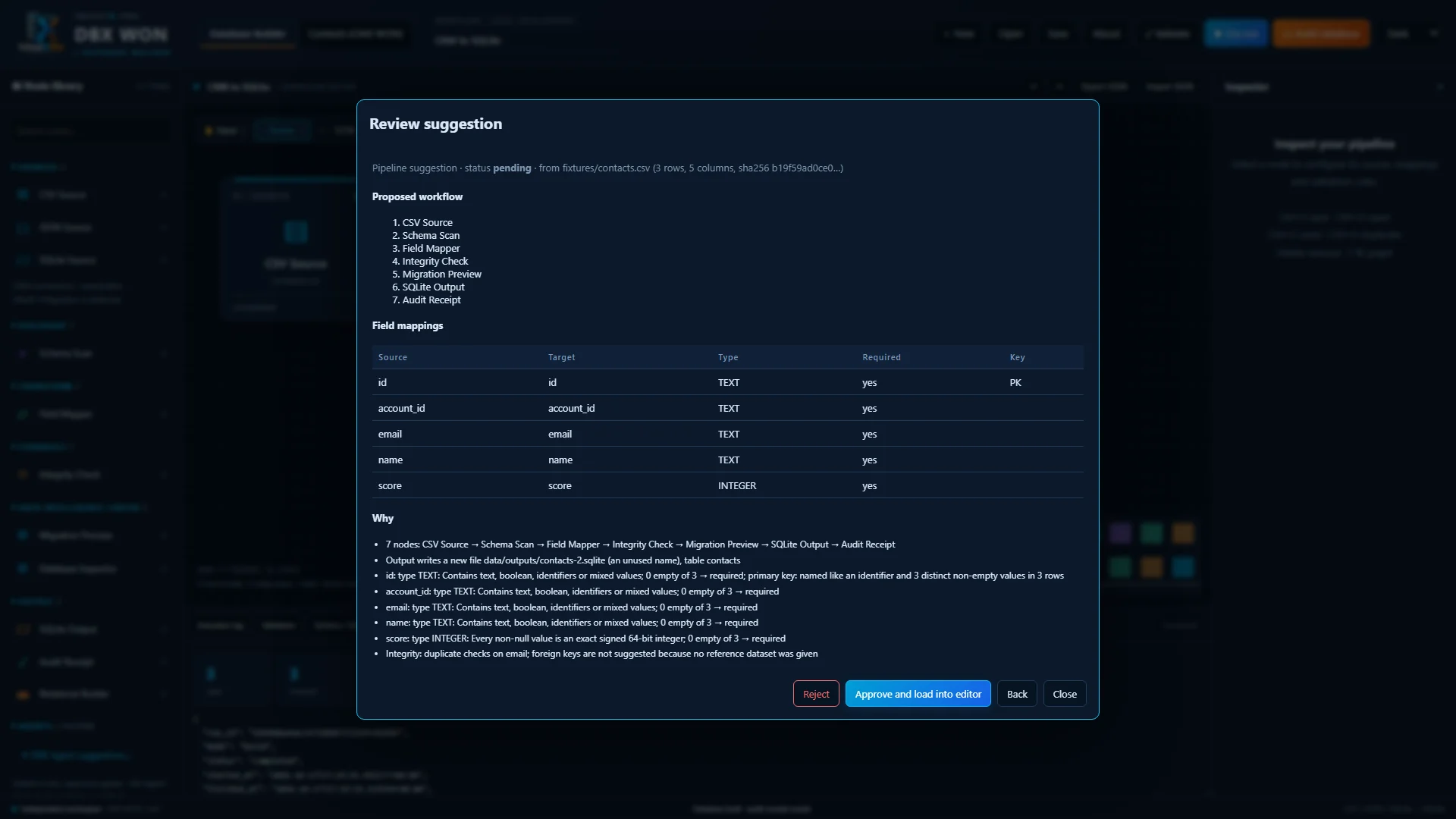
It explains your columns, suggests complete workflows and field mappings, and explains run results in plain language. It uses no AI model or online service, never shows row values, and every suggestion waits for your approval.

DBX Agent pipeline suggestion with proposed workflow, field mappings and reasons, waiting for approval

CMX WON contacts built in

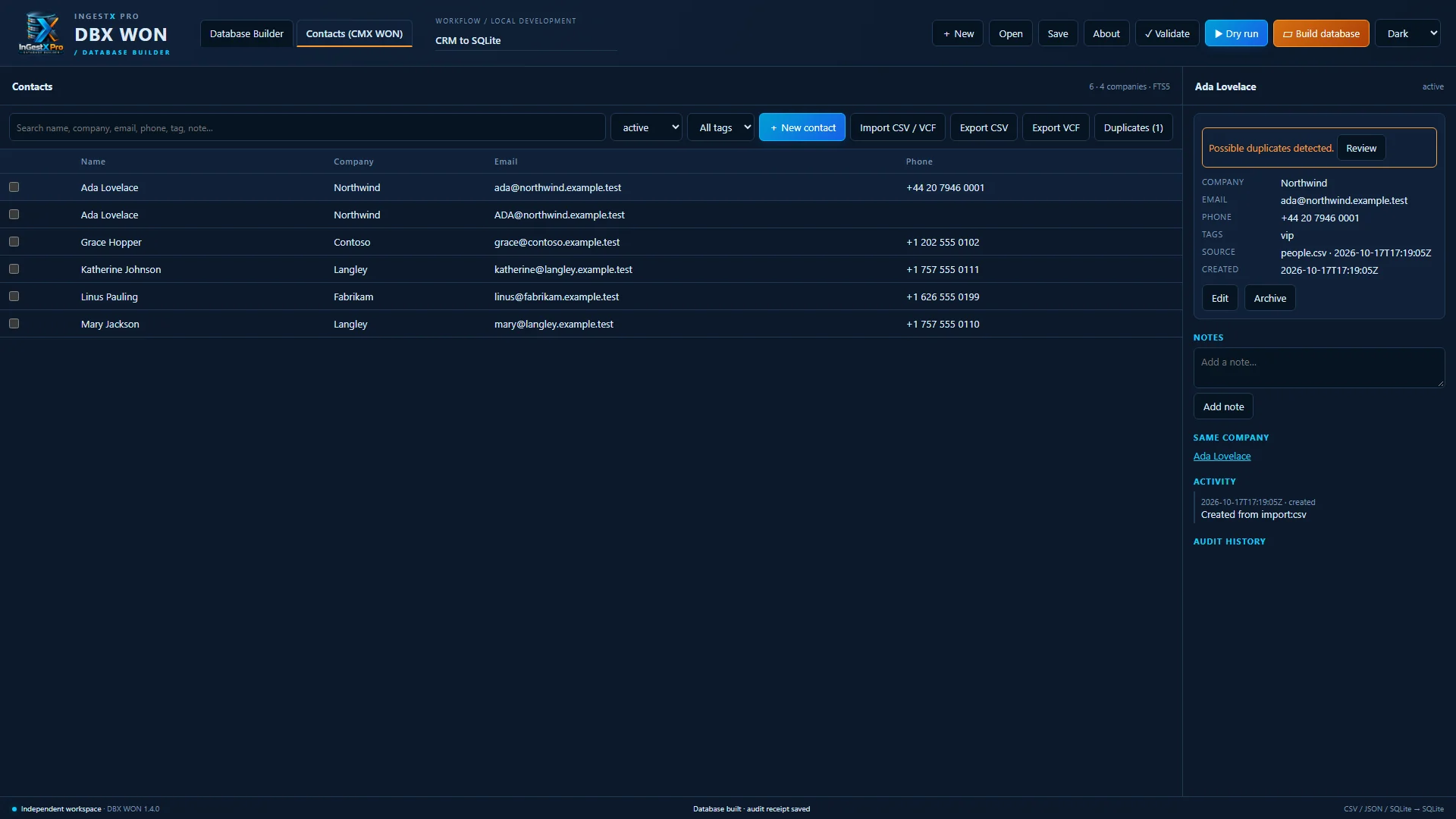
Contact profiles with notes, tags and history. Import CSV or vCard with a preview, find duplicates by email, phone or name, merge with confirmation, search, and export to CSV or vCard.

CMX WON contacts list with a contact profile and a possible-duplicate warning

Also included: a relational builder for several tables with joins, composite keys, foreign keys, indexes and SQL script export.

Demo

See it in action

The official trailer, recorded from the Windows application.

DBX WON official trailer · 1:21 · Playback starts only when you press play.

Specifications

Requirements and licensing

Operating system
Windows 10 version 2004 (build 19041) or later, x64. Tested on Windows 10 22H2.
Browser engine
Microsoft Edge (included with Windows 10 and 11) displays the app window
Storage
About 13 MB download and 22 MB installed, plus your data
Sources
CSV, JSON, JSONL and SQLite tables · up to 20 MiB, 100,000 rows and 256 columns per source
Output
New SQLite databases, SQL scripts and audit receipts
Contacts
CSV and vCard import (up to 5,000 contacts per import) and export
Connectivity
Works offline with no account. Purchase, installation and updates through the Microsoft Store need an internet connection.
Installation
Microsoft Store (MSIX package)
Themes
Dark, Light and System
License
$129.99 USD one-time purchase · perpetual license
Version
1.5.0

FAQ

Frequently asked questions

What does DBX WON do?

It builds clean SQLite databases from CSV, JSON, JSONL and SQLite files. You design the steps on a visual canvas, run a dry run to see problems before anything is written, and then build a new database with an audit receipt.

Can it damage my existing data?

Builds and repairs always write a new file and refuse to use a name that already exists. Database inspection is read-only, and approved repairs go to a new copy, so the original is never modified. Check the results before you rely on them.

Which data can it read and write?

It reads CSV, JSON, JSONL and SQLite tables, up to 20 MiB, 100,000 rows and 256 columns per source, and writes SQLite databases and SQL scripts. Other databases such as PostgreSQL, and cloud storage, are not supported.

Does it use AI?

No. The DBX Agent is a rule-based assistant that runs on your PC. It reads column types, counts and run receipts, never shows row values, uses no AI model or online service, and cannot run anything itself: every suggestion waits for your approval.

Does my data leave my PC?

No. Your files, databases, contacts and receipts are stored in your Windows profile, and the app's engine accepts connections only from your own computer. DBX WON has no analytics and sends nothing to Galaxy D2C. The app window is displayed by Microsoft Edge, which may contact Microsoft for its own services such as updates. See the privacy policy.

Can it connect to my CRM?

Not in this version. There are no live connections to HubSpot, Salesforce, Dynamics 365, Zoho or other online systems. Export your data from the CRM as CSV or JSON and build from that file.

What is CMX WON?

CMX WON is the contact manager built into DBX WON: profiles, notes, tags, CSV and vCard import and export, duplicate detection and merging. It is also planned as a separate contacts-only app that shares the same contacts.

Will it run on my PC?

It needs 64-bit Windows 10 version 2004 or later and Microsoft Edge, which is included with Windows. It has been tested on Windows 10 22H2.

How is it licensed?

$129.99 USD, one time, for a perpetual license. There is no subscription, trial or add-on. It is sold through the Microsoft Store and licensed under the DBX WON End-User License Agreement.

How do I get support?

Email support@galaxyd2c.com with your Windows version and the DBX WON version shown under About.